You don't need expensive hardware.
A €20 stick from Walmart runs ScreenLoom just fine. So does a €60 Fire TV, a Raspberry Pi, or whatever you've already got plugged into your TV. Here's what we've tested.
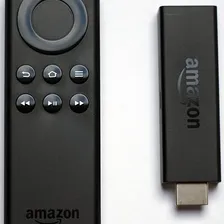
Amazon Fire TV Stick 4K Max
Our PickThis is what we recommend to most people. Wi-Fi 6E, a fast processor, 4K output - and it costs €60. Plug it into any TV with an HDMI port, install ScreenLoom from the app store, done. We use these ourselves.
Pros
- Wi-Fi 6E - solid wireless even in crowded spaces
- Handles 4K content and complex layouts without lag
- €60 and available everywhere
- Huge app store if you need other apps too
Cons
- You might need to restart it once a week for 24/7 use
- No built-in fleet management (use ScreenLoom for that)
Perfect for: Anyone who wants a reliable, affordable player that just works. Seriously, start here.
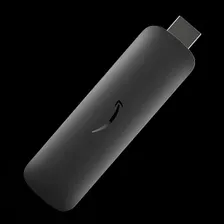
Amazon Signage Stick
Amazon's business-focused signage stick. Has built-in device management (MDM), scheduled power on/off, and bulk pricing through Amazon Business. If you're deploying 10+ screens across offices, this saves time.
Pros
- MDM support - manage dozens of sticks remotely
- Syncs power with your TV's schedule
- Cheaper per unit at volume
- Ethernet adapter option for wired connections
Cons
- Need an Amazon Business account for bulk orders
- 1080p only - no 4K
Perfect for: IT teams rolling out signage across multiple offices or floors. The MDM features make a real difference at 10+ screens.
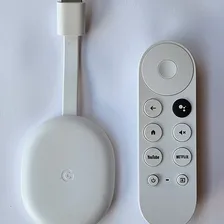
Google Chromecast with Google TV
Cheap, easy to set up, and you probably already know how Chromecast works. The newer 4K model handles signage content well enough for most use cases. You do need a Google account to set it up, and there are no signage-specific features built in - but with ScreenLoom installed, you don't need them.
Pros
- Familiar setup if you already use Google products
- €30-50 and easy to find
- 4K and HDR on newer models
Cons
- Needs a Google account to activate
- No built-in signage features
- Limited options for managing devices remotely
Perfect for: Cafes, small shops, or anyone who wants the cheapest possible way to try digital signage.
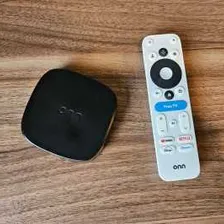
Onn Android Device (4K)
Twenty dollars. That's it. Walk into Walmart, pick one up, plug it in, install ScreenLoom. It runs Android TV, outputs 4K, and handles signage content without breaking a sweat. Build quality is fine - not premium, but at €20, who cares.
Pros
- €20 - the cheapest 4K option that actually works
- Pick one up at any Walmart
- Full Android TV with access to all signage apps
- 4K output that looks sharp on any display
Cons
- Plastic build - not winning any design awards
- Might need replacing after 2-3 years of non-stop use
Perfect for: When the budget is tight but you still want things to look good. Hard to argue with €20.
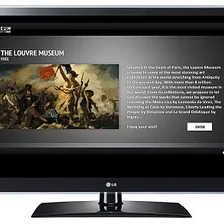
Chromecast Built-in TV
If your TV already has Chromecast or Android TV built in, you can skip buying a separate player entirely. Just install ScreenLoom from the app store on the TV itself. The catch: performance depends entirely on your TV brand, and some manufacturers stop pushing software updates after a year or two.
Pros
- No extra hardware - just the TV
- Clean look, no cables or dongles
- One less thing to power and manage
Cons
- Software updates might stop after 1-2 years
- Performance varies wildly between TV brands
- If the TV dies, you lose the player too
Perfect for: Permanent installations where you want a clean, minimal setup and your TV already supports it.
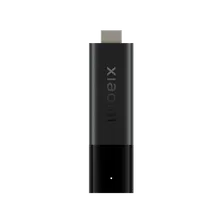
Xiaomi TV Stick 4K
Solid little stick that's easy to find outside North America. Build quality is actually nice for the price - Xiaomi put some thought into the design. Runs Android TV and handles ScreenLoom without issues. The main downside: hard to buy in the US/Canada (not on Amazon), and older models can be flaky.
Pros
- Affordable with full Android TV
- Easy to find in Europe, Asia, and Latin America
- Runs ScreenLoom and other signage apps well
Cons
- Hard to buy in North America
- Older models can have stability issues
Perfect for: Offices and venues outside North America, or multi-region setups where you need the same device everywhere.
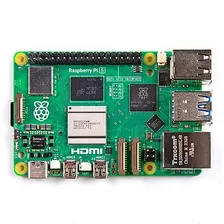
Raspberry Pi 5
If you're technical (or have someone who is), the Pi 5 is hard to beat. Dual 4K output, full Linux control, and rock-solid once configured. We've seen these run for months without a hiccup. You'll need to set it up yourself, but there's a huge community to help.
Pros
- Cheapest option when deploying lots of screens
- Full Linux - customize anything
- Dual 4K displays from one device
- Massive community, tons of tutorials
- Runs forever once set up properly
Cons
- Requires some initial setup and config
- You need to buy a case and power supply separately
- Not plug-and-play - some Linux knowledge helps
Perfect for: Tech-savvy teams, DIY deployments, or anyone running 20+ screens who wants full control and low hardware costs.
Amazon Fire TV Stick
The classic budget option. Tons of people start here and it works fine for basic signage. That said, for €25 more the 4K Max is a noticeably better experience - faster, sharper, more reliable. If you're buying new, go with the 4K Max. If you already have one of these lying around, it'll do the job.
Pros
- €35 and sold everywhere
- Lots of apps available
- Plug it in and go
Cons
- 1080p only - no 4K
- Older models struggle with complex layouts
- No scheduled reboot or signage features
Perfect for: Got one in a drawer? Use it. Buying new? Spend the extra €25 on the 4K Max.
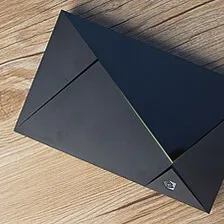
NVIDIA Shield TV Pro
The muscle car of Android TV devices. If your content involves 4K video walls, animations, live data feeds, or anything that would make a cheaper stick sweat - this handles it without breaking stride. Gigabit Ethernet, expandable storage, and NVIDIA actually keeps updating it.
Pros
- Fastest Android TV processor you can buy
- Handles heavy content that kills cheaper devices
- Built like a tank - metal body, solid construction
- Gigabit Ethernet + expandable storage
- NVIDIA still pushes regular updates
Cons
- €200 - more than 3x the Fire TV 4K Max
- Overkill if you're just showing slides and images
Perfect for: High-end lobbies, video walls, and anywhere that demands flawless 4K performance. Worth it when cheap isn't good enough.
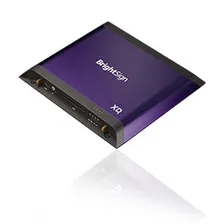
BrightSign Players
The enterprise standard. BrightSign players are built specifically for commercial signage - hardware watchdogs, scheduled reboots, remote management. If you're running screens in an airport or hospital and downtime isn't acceptable, this is what the industry uses. But it comes at enterprise prices and complexity.
Pros
- Built from the ground up for commercial signage
- Hardware watchdog - recovers from crashes automatically
- Rock-solid for 24/7 operation
- Enterprise fleet management and monitoring
Cons
- Needs BrightSign-specific CMS or custom setup
- €200-500 per unit
- More complex to set up than consumer devices
Perfect for: Airports, hospitals, retail chains - anywhere where a screen going dark costs real money.
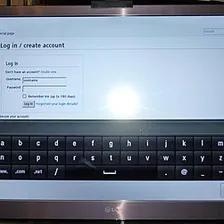
Your TV's Browser
Zero cost, zero hardware - just open your Smart TV's browser and navigate to ScreenLoom. Works great for testing or a quick temporary setup. TV browsers can be slower than dedicated players, but for basic content it gets the job done without spending anything.
Pros
- Free - use what you already have
- No setup required - works instantly
- Works on most Smart TVs
- Perfect for trying ScreenLoom before buying hardware
Cons
- Slower than dedicated players for complex layouts
- No auto-restart if the browser crashes
- Performance varies by TV brand
Perfect for: Testing ScreenLoom, temporary setups, or small screens where budget matters most.
Quick Comparison
Side by side - price, setup time, and how well each works with ScreenLoom.
| Device | Price | Setup Difficulty | ScreenLoom Support | Notes |
|---|---|---|---|---|
| Amazon Signage Stick | €55 | Easy | Medium-High | Best for managed business deployments |
| Amazon Fire TV Stick 4K Max | €60 | Easy | Medium | Best consumer 4K option |
| Google Chromecast with Google TV | €30-50 | Easy | Medium | Simple setup, decent ecosystem |
| Raspberry Pi 5 | €60 | Medium | Medium | Best for custom setups, highly reliable |
| Chromecast Built-in TV | Varies | Easiest | Medium | No extra hardware, variable quality |
| NVIDIA Shield TV Pro | €200 | Easy | Medium | Most powerful, premium installations |
| BrightSign | €200-500 | Medium | High | Enterprise-grade, mission-critical |
TL;DR
For most people: grab a Fire TV Stick 4K Max for €60. On a tight budget? The €20 Onn from Walmart works great. Running 20+ screens? Look at the Raspberry Pi 5 or Amazon Signage Stick.
Still not sure?
Drop us a line - we'll help you figure out the right setup for your space and budget. No sales pitch.
€5/screen/month. Start with one screen.
Simple digital signage with no annual contract. Build your first playlist when it suits you; help is available if you need it.
€5/screen/month · Cancel anytime
How it works
Create Account
Create an account with your email address.
Install Player
Install the player on a supported device, then pair it with your account.
Display Content
Upload content, choose a template or build a playlist, then publish it to your screens.